

Disclosure: As an Amazon Associate, I earn from qualifying purchases. Some links in this article are affiliate links.
Microsoft’s AI-PC standard took eighteen months to feel real anywhere. In Japan, where buyers ask harder questions about NPUs than anywhere else, the 2026 spring lineup is the first time the standard has produced a coherent set of choices. Here is what each of the four flagship picks is actually for, and what this all means for the Japanese AI-PC market.
Japan Market Pulse — Issue 008 | Gadget Watch
There is a small white-and-blue sticker, about the size of a postage stamp, on the lower-left palmrest of every laptop that meets Microsoft’s Copilot+ PC specification. The sticker reads “Copilot+ PC” in the same understated typography Microsoft has used since the Windows 11 launch. Two years ago, in May 2024, that sticker meant nothing — there were three machines on the planet that had it, all of them shipping in the U.S. only, and none of the actually interesting on-device AI features had launched yet. By April 2026, in Japan, that same sticker means roughly the following: this laptop has a Neural Processing Unit (NPU) capable of at least 40 TOPS, at least 16 GB of unified memory, at least 256 GB of fast SSD storage, and runs a special Windows 11 build that activates the on-device AI feature set Microsoft calls Copilot Runtime.
For most of those eighteen intervening months, the sticker was a marketing object in search of a use case. The on-device features were drip-released through the Windows Insider program, with Recall — the contentious “your PC remembers everything you’ve ever seen” feature — repeatedly delayed amid the Microsoft security review of mid-2024. The vast majority of consumer Windows machines shipped with NPUs that the operating system did not yet know how to use.
That has changed in 2026. Recall is shipping in stable form (with substantial post-controversy redesigns). Cocreator in Paint, the Live Captions real-time translation, Windows Studio Effects for video calls, and the on-device Phi Silica small-model agent that powers Copilot’s offline-friendly responses are all now production features. The cumulative effect, on a machine where the NPU actually exists and is wired correctly, is meaningful.
The Japanese consumer market — with its characteristically deliberate adoption of any computing-device category, and an unusually high baseline knowledge among buyers about what NPU and CPU and TOPS mean — has spent the lead time waiting. By the start of 2026, every major OEM with a Japanese sales channel had a Copilot+ PC on shelves. By late March, the Japanese consumer-tech magazine GetNavi was confident enough in the category to put a four-machine head-to-head on pages 22 and 23 of its May 2026 issue: a deliberate “use-case-by-use-case” comparison framed around what kind of buyer each machine is for.
This is the story of those four machines, and what their differences tell us about how the Japanese AI-PC market is going to sort itself out over the next eighteen months.
What 40 TOPS Actually Buys You
 Forty TOPS is the spec floor that turns the on-device Copilot Runtime feature set from a marketing object into a working tool.
The headline number on every Copilot+ PC marketing page is “40 TOPS NPU” — TOPS being trillion operations per second on the neural-processing unit that sits next to the CPU and GPU on the System-on-Chip. Microsoft’s spec floor is 40 TOPS; current-generation flagship parts ship somewhere between 45 and 50 TOPS in the consumer tier (the Snapdragon X Elite at 45 TOPS, the Intel Core Ultra 200V “Lunar Lake” at 47 TOPS, the AMD Ryzen AI 300 at 50 TOPS).
Forty TOPS is enough to run small-language-model (SLM) inference, modern image-generation pipelines, real-time speech-to-text and translation, and live video-effects processing — entirely on the device, without a network round-trip and without sending any of the input to a cloud service. The marquee Microsoft demonstration, Recall, processes a screenshot every few seconds and uses the local NPU to extract searchable embeddings; what makes the feature defensible (and, crucially, GDPR-compatible) is that the embeddings never leave the laptop. Cocreator in Paint runs Stable Diffusion-class image generation locally at one to three seconds per image. Live Captions translates spoken language across about forty pairs in real time, with no network connection.
The buyer-side question is: how much of this do you actually use?
The honest answer, in Japanese mid-2026, is that the on-device AI features are useful in three specific contexts and are largely irrelevant in the rest. The contexts are: (1) knowledge-work productivity for users who handle confidential documents that legally cannot leave the device — primarily corporate, legal, medical, and regulated-industry users; (2) content creators doing image generation or local LLM work as part of a creative workflow; and (3) mobile users in network-poor environments — international travelers, regional Japan, Shinkansen commuters — for whom “the AI works without a connection” is a daily-life upgrade rather than a marketing line.
For the median Japanese consumer who uses their PC primarily for web browsing, Microsoft Office, Zoom, and YouTube, the Copilot+ feature set is — to put a mild word on it — over-engineered. That is not a knock on the standard. It is the same shape of curve that discrete GPUs followed in the early 2010s: useful for the 20% who needed them, irrelevant to the 80%, and nonetheless gradually becoming the baseline as the price differential narrowed. The Japanese 2026 spring lineup is at exactly that inflection: Copilot+ PCs are no longer materially more expensive than non-NPU equivalents at most price points, so the question is increasingly “why wouldn’t you?” rather than “why would you?”
CASE 1 — Entry: Dell Inspiron 14 Plus (Snapdragon X)
The first GetNavi pick is the Dell Inspiron 14 Plus — labeled “CASE 1: For people who want to try a Copilot+ PC for the first time,” priced from ¥153,704 (about USD $1,000), and configured around the Snapdragon X (non-Plus, non-Elite) entry-tier Qualcomm chip with 45 TOPS of NPU.
Dell’s positioning is interesting. The Inspiron 14 Plus is, by deliberate design, the cheapest credible Copilot+ PC in the Japanese channel. The trade-offs it makes to hit that price are well-chosen: a 14-inch IPS display rather than OLED, a polycarbonate-blend chassis rather than aluminum, a single Thunderbolt-class USB-C port rather than two, and the entry-tier Snapdragon X (with eight Oryon cores rather than the Plus’s twelve or the Elite’s twelve high-clocked variants). Battery life, in the Japanese reviewers’ real-world tests, lands at 15–17 hours of mixed productivity work — which is close to the published spec because the Snapdragon platform is genuinely battery-frugal in a way the Intel U-series of the previous generation never quite was.
What you do not get is performance headroom. Compile a Rust project, render a 4K timeline, run a local 13-billion-parameter LLM at any kind of useful speed: the Inspiron 14 Plus is not the right machine. What you do get is the full Copilot+ feature set — Recall, Cocreator, Studio Effects, Live Captions — on a thoroughly competent traditional Windows productivity laptop, at a price that competes head-on with non-NPU Lenovo IdeaPads and HP Pavilions.
A quirk of the Dell channel in Japan: this machine is not on Amazon Japan and not on Amazon US. Dell’s distribution strategy in this segment is direct (Dell.com), through the Dell-owned reseller chain, and through Costco Japan and the major electronics-retail chains (Bic Camera, Yamada Denki). For an English-language reader who wants to track this exact spec, the canonical source is Dell’s own product page at dell.com/en-us/shop/dell-laptops/inspiron-14-plus-laptop.
The Japanese magazine pitch — “for people who want to try a Copilot+ PC” — is honest. This is the entry door. Most buyers who walk through it will use the laptop for the same things they would have used a 2022 Inspiron for. A small, growing minority will discover, several months in, that Studio Effects is the reason their Zoom calls now look better than their colleagues’, or that Cocreator is the reason they finally stopped paying for a stock-image subscription. The category enters households quietly.
CASE 2 — Ultralight: Fujitsu FMV Note U UA-K1
Pick number two is CASE 2: For people who want a Copilot+ PC that is light to carry — Fujitsu’s FMV Note U UA-K1, the company’s flagship 14-inch ultralight running an Intel Core Ultra (Lunar Lake) part with the requisite 47-TOPS NPU.
Fujitsu’s position in the Japanese laptop market is unusual and worth a paragraph of context for international readers. Until 2018, Fujitsu was one of the world’s top ten laptop OEMs, with an export business covering Europe, Australia, and parts of North America. In 2018 the company’s PC division was carved out into a joint venture with Lenovo; the result, Fujitsu Client Computing Limited (FCCL), retained Fujitsu’s Japanese-domestic engineering, branding, and dealer network, but was effectively de-internationalized. The FMV brand is now sold almost exclusively into Japan. The FMV Note U is — in this exact sense — a Japan-domestic computer, with no English-language Amazon listing, no U.S. distribution channel, and a Japanese-only after-sales support model.
This matters because the FMV Note U embodies a specific Japanese-market design philosophy that does not survive the trip across the Pacific. The chassis is magnesium-alloy and weighs 869 grams — putting it in the same weight bracket as the LG Gram 14 — but the design priorities are different. Fujitsu’s keyboard is conservative, the trackpad is undersized by U.S. standards, the screen is 16:10 rather than 16:9 but at the more conservative 1920×1200 native resolution, and the chassis includes a physical privacy shutter on the webcam, a fingerprint reader integrated into the power button, and an always-on USB-C charging passthrough that can charge the laptop from a portable power station while the user is away from a wall outlet. None of those individually are unique. The aggregate is recognizably Japanese-corporate-laptop in a way that Lenovo ThinkPad legitimately is not anymore.
The Copilot+ NPU work, on this machine, is concretely useful for a salaryman population that uses the laptop for long-distance Shinkansen work sessions: Live Captions for English-language conference calls done on board, on-device Phi Silica responses for Copilot queries that would otherwise time out on patchy mobile data, and (less glamorously) on-device noise suppression that makes the laptop’s two microphones legible against Shinkansen-tunnel acoustic mush. The use case justifies the spec, and the spec justifies a Japan-domestic-only product. Fujitsu’s bet is that the hardware-software-service triplet, all delivered in Japanese, is worth more to a Japanese corporate buyer than an internationalized cousin would be. So far the Japanese channel data agrees.
CASE 3 — High-Performance: ASUS Vivobook S 14 (Intel Core Ultra 7 258V)
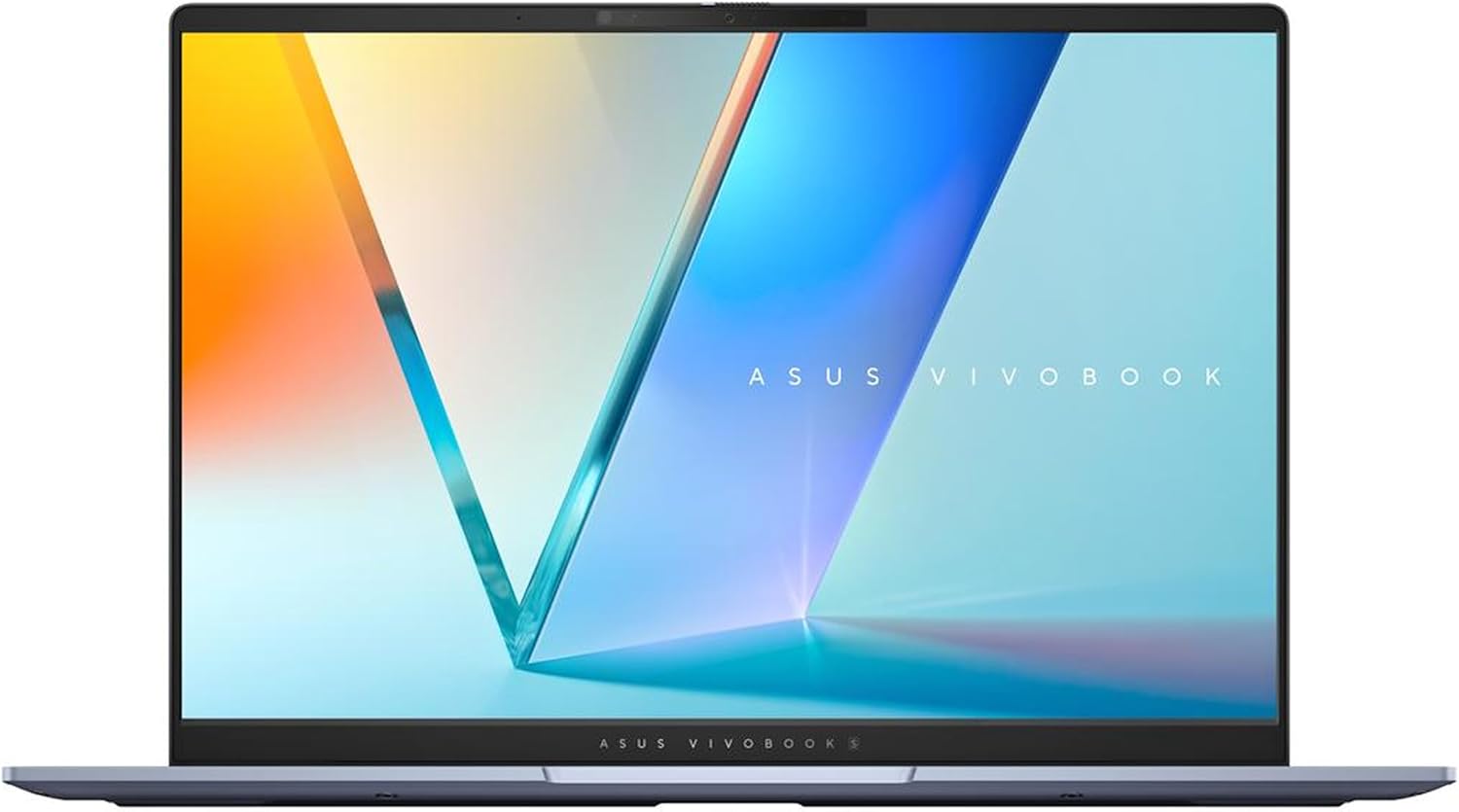 ASUS Vivobook S 14 (S5406SA) in Mist Blue — Intel Core Ultra 7 258V Lunar Lake, 32 GB / 1 TB, 2880×1800 OLED at 120 Hz. The Copilot+ pick for performance buyers.
The third pick is the most performance-focused: CASE 3: For people who want to use Copilot+ PC capabilities to their fullest — the ASUS Vivobook S 14 (S5406SA) in Mist Blue, configured with the Intel Core Ultra 7 258V (the top SKU of the Lunar Lake mobile lineup), 32 GB of LPDDR5X memory, and 1 TB of PCIe SSD. The Japanese list price is around ¥249,800 (about USD $1,650), and the U.S. equivalent ships through Amazon at ASIN B0DKVRMZV2.
The Vivobook S 14 is doing several interesting things at this price point. The 14-inch panel is a 2880×1800 OLED at 120 Hz, which is rare-to-impossible at this segment from competing OEMs. The Intel Core Ultra 7 258V is a four-performance-core, four-efficiency-core part that, on a CPU-bound workload, outperforms the Snapdragon X Elite in non-emulated x86 software by roughly 15–25% in independent reviews — a meaningful gap if the buyer’s actual workflow includes Windows-only x86 desktop applications (as much corporate Japan still does). The NPU sits at the spec-required 47 TOPS, fully wired into Windows Studio Effects, Live Captions, and the rest of the on-device AI feature set.
The Vivobook S 14 is also where the question of “Copilot+ PC as a creator workstation” gets serious. Local Stable-Diffusion-class image generation — running through DirectML on the integrated Arc graphics rather than the NPU — clocks in at acceptable hobbyist speeds. Local LLM inference, with llama.cpp using the Lunar Lake NPU through DirectML, can run a 13-billion-parameter quantized model at conversation speed. None of this is reason on its own to buy this exact laptop. It is reason to know that the laptop will hold up to the workload if the buyer’s interests evolve in that direction.
The trade-off on the Vivobook is that it is not as battery-frugal as the Snapdragon-based competition. The Lunar Lake architecture has closed most of the gap with Qualcomm — Intel’s own published spec is 20 hours of video playback — but in mixed productivity testing the machine lands closer to 12–14 hours, several hours short of the Inspiron 14 Plus’s Snapdragon X part. For a buyer whose calculus is “performance in the hour I need it” rather than “all-day battery,” the trade is favorable.
The ASUS Japanese channel reach — Yodobashi Camera, Bic Camera, Yamada Denki, e-Trend — is the strongest of the international OEMs in Japan, behind only the domestic Fujitsu and NEC brands. The Vivobook S 14 is the most likely 2026 spring purchase by a Japanese consumer who walks into a major electronics retailer with no specific brand in mind and is asking the salesperson “what’s the best Copilot+ laptop you sell.”
CASE 4 — Reference Baseline: Microsoft Surface Pro 11
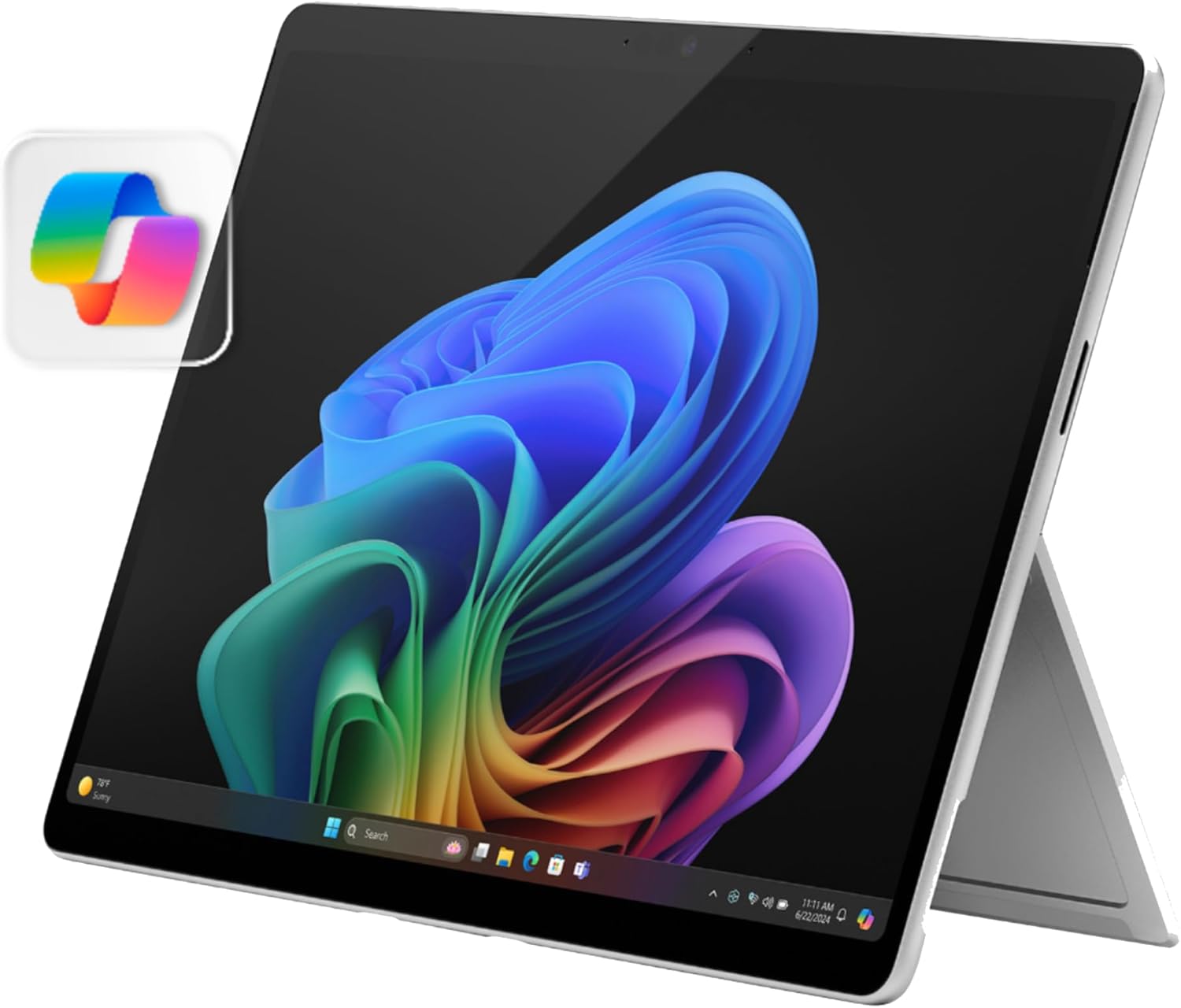 Microsoft Surface Pro 11 — the reference baseline. The Copilot+ feature set was tuned around this exact device.
The fourth pick is implicit in the Japanese magazine coverage rather than explicitly listed in the GetNavi quartet — but it is impossible to write about the Japanese 2026 Copilot+ landscape without addressing it. Microsoft’s own Surface Pro 11 is the reference baseline that all of the OEM machines are positioned against, in roughly the same way the iPhone is the implicit baseline of any Android phone review.
The Surface Pro 11 (US ASIN B0CXL5272V) ships with a Snapdragon X Plus chip, 16 GB of unified memory, 256 GB of fast SSD storage, and a 13-inch 2880×1920 LCD touchscreen at 120 Hz. The complete Surface Pro 11 with the Slim Pen 2 and the Surface Pro Keyboard runs to roughly ¥220,000 in the Japanese channel — meaningfully cheaper than the ASUS, more expensive than the Dell, in the same neighborhood as the Fujitsu.
What makes the Surface Pro 11 the reference, beyond the Microsoft-makes-it pedigree, is that it is the machine the Copilot+ feature set was designed around. Recall is tuned for the Surface’s exact display and stylus behavior. The keyboard’s haptics include Copilot-specific feedback states. The Snapdragon X Plus integration — particularly around camera and microphone behavior — is closer to first-party than any third-party OEM has shipped. If the question is “what is a Copilot+ PC supposed to feel like,” Microsoft’s answer is sitting in plain sight.
The trade-off, predictable to anyone who has used a Surface for any length of time, is the 2-in-1 form factor. The detachable keyboard is excellent on a desk, awkward on a lap, and deeply frustrating on a Shinkansen tray table. The screen size is generous for a tablet, modest for laptop work. The kickstand is best-in-class and still a kickstand. Buyers who want the canonical Copilot+ experience are well-served. Buyers who want a laptop are usually better off with one of the GetNavi-recommended OEM picks.
What This Means for the Japanese AI-PC Market
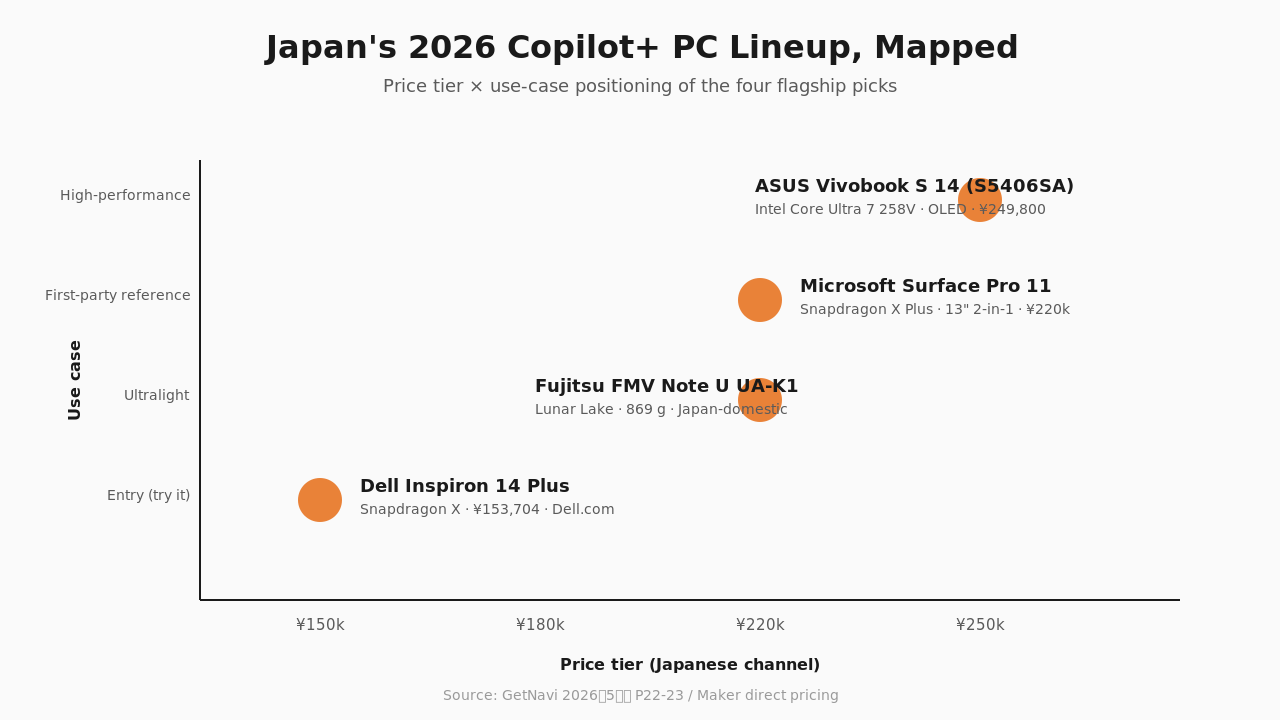 The Japanese 2026 AI-PC market sorted into three tiers — domestic-corporate (Fujitsu, NEC), international mid-premium (ASUS, Dell, HP, Lenovo), Microsoft first-party (Surface).
Step back from the four-machine comparison and the structural picture clarifies. The Japanese 2026 AI-PC market has, with some lag, sorted itself into the same shape as the broader Windows market: a domestic-corporate tier (Fujitsu, NEC) at the top of the Japan-domestic price band, an international mid-premium tier (ASUS, Dell, HP, Lenovo) capturing most of the Japanese consumer purchases, and the Microsoft first-party reference (Surface) selling primarily to creative professionals and IT-department early adopters.
What is new about the AI-PC layer, on top of this conventional sort, is that the NPU specification floor is unusually unforgiving. A laptop without a 40+ TOPS NPU is, today, simply not eligible for the Copilot+ feature set, and Microsoft has made clear it has no intention of softening the floor. That has the effect of pushing every Japanese OEM toward, in essence, two product tracks: a Copilot+ track that targets the spec, and a non-NPU track that does not. The non-NPU track is cheaper but is also, increasingly, marketed as the budget option.
For Japanese consumers, the practical implication is that the meaningful Copilot+ purchase decisions in 2026 are going to be made between the four price tiers represented in the GetNavi feature, not between Copilot+ and non-Copilot+. Within each tier, the choice is between:
- Snapdragon platforms (Dell Inspiron 14 Plus, Surface Pro 11), which optimize for battery life and Qualcomm’s emulation-tolerant architecture, useful if the buyer’s daily software is mostly modern Windows apps
- Intel Lunar Lake platforms (ASUS Vivobook S 14, Fujitsu FMV Note U), which optimize for raw x86 performance and full driver-stack compatibility, useful if the buyer runs a long tail of older Windows software or specialized creative apps
The choice between Snapdragon and Lunar Lake is, for Japanese 2026 buyers, the meaningful axis. The TOPS number is the same on both. The on-device feature set is the same on both. What differs is which other software the user already needs the laptop to run.
This is, unromantically, a sign that the Copilot+ category has matured. Two years ago the question was whether on-device AI was a real thing. One year ago the question was which features actually shipped. Today, in the Japanese consumer channel, the question is which of two competent CPU architectures fits the buyer’s secondary workload. That is the kind of mature-market question that defines a category for the rest of the decade.
TL;DR — Which Copilot+ PC Should You Buy
If you want to try a Copilot+ PC at the lowest credible price: Dell Inspiron 14 Plus — Snapdragon X, ¥153,704, available through Dell.com.
If you want the lightest carry-around Copilot+ PC for a Japanese commuter context, and you do not need international support: Fujitsu FMV Note U UA-K1 — Lunar Lake, 869 g magnesium, Japan-domestic only.
If you want performance headroom for content creation, local LLM hobby work, or x86-heavy Windows software: ASUS Vivobook S 14 (S5406SA) — Intel Core Ultra 7 258V, 32 GB / 1 TB, OLED, B0DKVRMZV2.
If you want the canonical Copilot+ first-party experience and can live with a 2-in-1 form factor: Microsoft Surface Pro 11 — Snapdragon X Plus, B0CXL5272V.
The four machines are real, all four ship in volume in Japan today, and the choice between them is, in 2026, a meaningful one for the first time since the Copilot+ standard launched.
Subscribe at ketchups.co/japan-market-pulse.
If you’re interested in this topic, the Japanese market more broadly, or what KETCHUPs is working on, we’d love to hear from you — please reach out via our contact form.
If you’re interested in this topic, the Japanese market more broadly, or what KETCHUPs is working on, we’d love to hear from you — please reach out via our contact form.
Japan Market Pulse is a weekly read on what the Japanese consumer-tech, food, and mobility markets are choosing to do, written for international operators who want to know what is happening before it shows up in the global trade press.
Subscribe at ketchups.co/japan-market-pulse.